Record E-01 – Accounts
Hacked account: the warning signs, and the order to read them in
Seven indicators, every one of them readable from the account settings.
An intrusion almost always leaves a trace, and the trace is three clicks away. What makes it hard is not the technology – it is that the first instinct destroys part of the evidence.
A compromised account rarely announces itself with a dramatic symptom. It announces itself with a device you do not own sitting in a list, a rule copying your mail somewhere else, a recovery number you never entered.
The seven indicators, and where each one is read
Every one of them is visible from the account settings, without any tool and without help. They are listed in the order the settings present them rather than by severity, because that is the order in which they are actually found.
A device you do not recognise appears in the list of sessions.
Account settings, security or recent activity.A sign-in is dated to a country or an hour that matches nothing.
The same list: the address column and the timestamp column.A session is still open on a device you cannot place.
The active sessions list, which closes them remotely from that page.A rule copies incoming mail to an outside address.
Mail settings: filters, then automatic forwarding, two separate screens.A recovery address or phone number has been added.
Account settings, recovery information.The password changed without you changing it.
The account security history, which dates the change.Contacts receive messages you did not write.
The sent folder; if it is empty, the sender may have been forged without any access.The last one is the one that misleads most often, and W-7 is worth reading together with the section further down on what is not a sign. A message that never appears in the sent folder was not sent from the account.
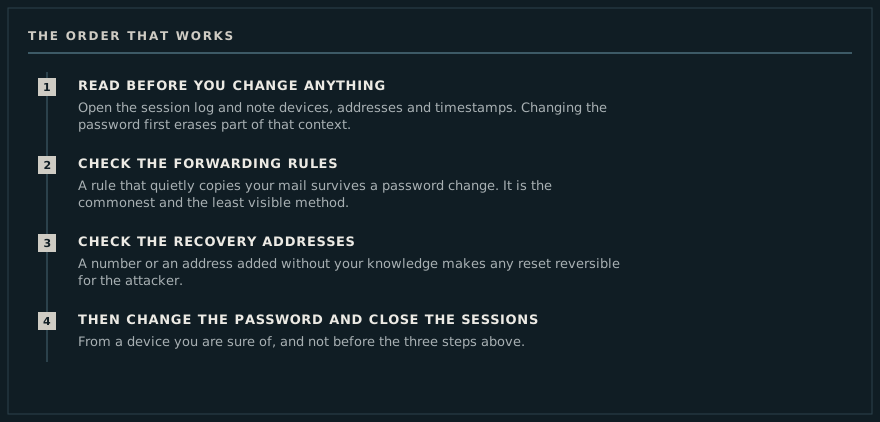
Read the session log first
The log lists devices, addresses and timestamps. A login from a country you were not in, at an hour you were asleep, settles the question. Note the timestamps before changing anything: they date the intrusion, and every later step will ask for that date.
Then the forwarding rules
This is the commonest method and the least visible one. A copy rule moves nothing: the mail arrives normally and a duplicate goes elsewhere. It takes seconds to set and it survives a password change, which is why so many “recovered” accounts stay readable for months.
Four places need opening, not one: filters, automatic forwarding, aliases, and connected applications. The last two are the ones most often missed.
Then the recovery addresses
A serious attacker replaces the recovery address and phone number before anything else. While they belong to the attacker, every reset you trigger goes back to them, and regaining control runs in circles.
Only now, the password
Change it from a device you trust, close every other session, and turn on two-factor authentication. Two-factor stops a fresh takeover by password alone; it does not undo a forwarding rule that was already in place.
The full French treatment is at compte piraté : les signes et que faire.
What is not a sign, and costs time
Three observations worry people regularly and establish nothing. A sudden flood of marketing email usually means an address has been sold on, not that an account is being used. A slow computer is nine times out of ten an update or a full disk. And a contact reporting a "strange link from you" matters when the message is in your sent folder, and not at all when an address has merely been forged as the display sender, which requires no access whatsoever.
Telling those apart from a real intrusion takes two minutes and saves a pointless reset of everything. The session log settles it; the impression does not.
What to keep, and why
If the matter has to be reported, the file is worth what its dated evidence is worth. Three items usually suffice: a capture of the session log showing the unknown device and its timestamp, a capture of the forwarding rule or added recovery address, and the messages themselves. All three must be taken before anything is cleaned up – once the session is closed and the rule deleted, the screen shows nothing, and an account of events is not a trace.
The related question, whether an address appears in a published breach, is a different one with a different answer; the French edition separates them on vérifier si une adresse mail a fuité.